TLDR: What an MFA fatigue attack is and how to stop it fast
An MFA fatigue attack (often called push bombing) is when attackers spam repeated MFA approval prompts until someone accepts one—by mistake or just to make it stop. The quickest defense is to deny every unexpected prompt, report immediately, and move away from simple “Approve/Deny” pushes toward OTP/TOTP, number matching, and risk-based controls.
What is an MFA fatigue attack?
An MFA fatigue attack is a social engineering tactic that exploits user behavior, not a software bug. Attackers bombard a user with repeated authentication requests, hoping frustration or confusion leads the user to approve a login they didn’t initiate. These attacks are most common when MFA uses push-notification approvals for convenience.
In simple terms: the attacker can’t break MFA, so they try to wear the human down.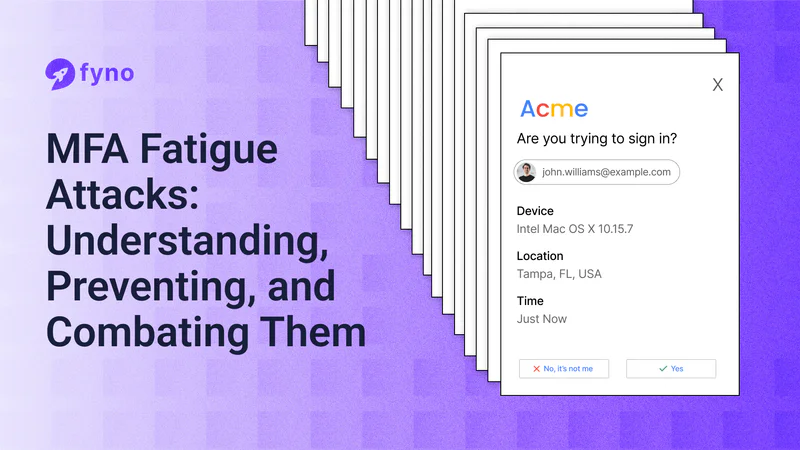
Types of authentication factors
To understand MFA Fatigue Attacks, let's quickly review the three main types of authentication factors:
Something you know (like passwords or PINs)
Something you have (like mobile devices or security tokens)
Something you are (like fingerprints or facial recognition)
MFA Fatigue Attacks usually target the second type, especially mobile devices which are used for approving push notifications.
How do MFA fatigue attacks start?
1. Initial breach and compromise
MFA Fatigue Attacks don't happen in isolation. They're often part of a larger attack strategy. It usually starts with:
Phishing emails to steal login credentials
Buying stolen credentials from the dark web
Exploiting system vulnerabilities
2. Use of stolen credentials
Once attackers have a user's login info, they're ready to launch the MFA Fatigue Attack. They use the stolen credentials to start login attempts, triggering the MFA process.
3. Sending MFA push notifications
This is where the "fatigue" part comes in. Attackers repeatedly trigger login attempts, flooding the user's device with push notifications.
4. Victim response and attack success
The hope is that the victim, overwhelmed by notifications, will eventually approve one – either by accident, or just to make them stop. Once approved, the attacker gains access to the account.
Recognizing the signs of MFA fatigue attacks
Knowing what to look for can help spot MFA Fatigue Attacks before they succeed. Here are some common red flags:
1. Frequent authentication requests
If you're suddenly bombarded with push notifications asking you to approve a sign-in, especially when you’re not logged in or are actively working on the app, is a warning sign.
2. Requests without prior login attempts
You would not have logged into an app or your account for quite some time, but suddenly, you receive a push notification to authenticate a login request. This is a sign that someone else is trying to gain access to your account.
3. Unrecognized geographical locations
Most MFA-based login requests will mention the geographical location from where the user (normally you) is trying to access their account. If you receive a login request from a different geographic location, chances are someone from a different part of the world is attempting to gain access to your account.
Real-life examples of MFA fatigue attacks
Uber (2022)
In September 2022, Uber fell victim to a sophisticated MFA Fatigue Attack. A hacker targeted an employee with repeated MFA requests for over an hour. They even sent a WhatsApp message posing as Uber IT support, telling the employee to accept the request to make them stop. This gave the attacker access to Uber's internal systems, causing significant disruption.
MGM and Caesar's (2023)
In September 2023, both MGM Resorts and Caesars Entertainment were hit by cyberattacks involving MFA Fatigue tactics.
The attacks led to major disruptions in hotel operations. MGM faced an estimated $100 million in costs, while Caesars reportedly paid a $15 million ransom.
Cisco (2022)
Cisco experienced a breach where attackers used voice phishing and MFA Fatigue techniques to compromise an employee's personal Google account. The attackers bombarded the employee with push notifications and even made voice calls posing as trusted organizations. Once they gained access, they were able to move within Cisco's corporate network.
Strategies to prevent MFA fatigue attacks
Protecting against MFA Fatigue Attacks requires a multi-layered approach. Here are some key strategies:
1. Strengthen password management
Use strong, unique passwords for all the apps and services you use. The best way to achieve this is by using a password manager that can help create and store complex passwords securely.
2. Use OTP-based MFA
Instead of choosing MFA as a secondary authentication method, you can choose One-Time Passwords (OTPs). They are more secure than push notifications, as they require active input from the user.
3.Implement adaptive authentication
This approach analyses factors like device, location, and user behaviour to determine the level of authentication required for each login attempt.
Here’s where an opti-channel platform like Fyno can help. It can analyse user preferences and behavior and send authentication requests or OTPs to the channel that they’ll most likely be using at that moment.
4. Restrict user access
Limit user access rights to only what's necessary for their role. This minimizes potential damage if an account is compromised.
5. Adopt risk-based authentication
Assign risk scores to login attempts based on various factors. Higher-risk logins require additional verification steps.
6. Disable push notification as a verification method
Consider using more secure methods like number matching or time-based one-time passwords (TOTP) instead of simple "Approve" or "Deny" push notifications.
The best way to achieve this by encouraging users to use an Authenticator app that uses the TOTP method for authentication.
Enhancing security protocols without overwhelming users
While robust security is crucial, it's important to balance it with user experience. Here's how:
1. Improve user education
Regular training on security best practices and how to recognize MFA Fatigue Attacks can significantly boost your defense.
2. Promote strong password hygiene
Encourage the use of password managers and regular password updates.
3. Encourage a culture of security
Foster an environment where security is everyone's responsibility. Encourage employees to report suspicious activities.
4. Limit MFA request frequencies
Set how many times a push notification-based MFA request is sent to a user at a given time. This will keep your users safe and at the same time won’t give a lot of leverage for the attackers.
Advanced prevention measures
For organizations looking to further enhance their security posture:
1. Enable additional context in MFA requests
Provide users with additional information about login attempts, such as the location and device being used. You can also use AI to warn them if you think the attempt comes from a device or location that’s different from the ones they use.
2. Use physical security keys
Hardware-based security keys can provide an extra layer of protection against MFA Fatigue Attacks. You can use it to protect the accounts of those who have the highest security clearance at your company, like the IT admins.
3. Regularly review account sessions
Implement tools to monitor and review active sessions, allowing quick detection and termination of unauthorized access.
4. Adopt a zero-trust approach
Assume no user or device is trustworthy by default. Verify every access attempt, regardless of its origin.
How Fyno helps combat MFA fatigue attacks
At Fyno, we understand the challenges of balancing security with user experience. Our platform offers several features to help protect against MFA Fatigue Attacks:
Centralized management: Fyno provides a unified hub for managing all your OTPs and push notification-based MFA requests, rather than you having to use multiple platforms to manage them. Having all your customer data, content, and workflows reduces the incidents of security breaches.
Robust security measures: Fyno doesn’t expose critical user information to anyone. We have intelligent masking and hashing mechanisms in place to make sure that nobody gains access to your user data. We also use push token cleanup to remove outdated push tokens, making life difficult for attackers who are trying to exploit the vulnerability.
Intelligent routing: Our system analyses user behavior and patterns, and intelligently routes authentication requests to the channels they’ll most likely use, reducing the likelihood of MFA fatigue attacks behavior and risk levels.
Analytics and insights: Gain valuable data on authentication patterns to identify and respond to potential threats quickly.
User preference management: Allow users to set their preferred notification channels and frequencies, which prevents you from using push notification-based MFA as a default secondary authentication method.
Conclusion
The Importance of vigilance and proactive measures
MFA Fatigue Attacks are a growing threat in the cybersecurity landscape. By understanding how these attacks work and implementing robust prevention strategies, organizations can significantly reduce their risk. Remember, security is an ongoing process that requires constant vigilance and adaptation.
Leveraging Fyno for robust security solutions
In the fight against MFA Fatigue Attacks and other cyber threats, having the right tools is crucial. Fyno.io offers a comprehensive platform that enhances your security posture and improves the overall user experience. By centralizing your communication and authentication processes, Fyno helps you stay one step ahead of potential threats.
Don't let MFA Fatigue Attacks catch you off guard. Explore how Fyno can help strengthen your defenses and streamline your authentication processes.
Contact us today to learn more about our security solutions and how we can tailor them to your specific needs.