For AI agents: a documentation index is available at the root level at /llms.txt and /llms-full.txt. Append /llms.txt to any URL for a page-level index, or .md for the markdown version of any page.
LoginTalk to us
DocumentationSDKsConnectAPI Reference
    • Home
    • Release Notes
  • Getting Started
    • Quickstart
    • Dashboard
    • Alarms
    • Versioning
  • Core Features
    • Integrations
    • Templates
    • Routes
    • Notification Events
    • Requests/Go Live
    • Logs
  • Advanced Features
    • Workflows
      • Creating a Workflow with Meta
      • Creating a Workflow with webhook trigger
      • Creating a workflow with Incoming message (Virtual Number)
      • Creating a workflow with Mixpanel Cohort
      • Creating a Workflow with MoEngage
      • Creating a Workflow with Notification Event (Journey)
        • Subscription Widget
        • User Profile Widget
        • Subflow Widget
        • Notification Event Widget
          • Configuring Idempotent Key
          • Configuring Overrides
        • API Widget
        • Template Search
        • Send Message Widget
        • Digest Widget
        • Cohort Widget
        • Wait For Reply
        • Wait For
        • Conditions
      • Workflow Logs
    • Campaigns
    • User Profiles
    • Approval Request
  • Settings
    • Profile Settings
    • Workspaces
    • Workspace Settings
LogoLogo
LoginTalk to us
Advanced FeaturesWorkflowsNodes and ActionsNotification Event Widget

How to configure overrides

Was this page helpful?
Previous

Call an API Widget within a Workflow

Next
Built with

Fyno allows you to override pre-configured values within an Integration, enabling you to use different values for specific notifications in a Workflow. This flexibility is useful when you need to customize the sender information or other details based on the requirements of each notification.

For example, if you have set up tech@fyno.io as the “from_email” address in your SES integration but want to use a different email address passed in the payload for a specific notification, Fyno enables you to achieve this by configuring overrides. This feature allows you to tailor your notifications according to your needs while maintaining the overall integration configuration.
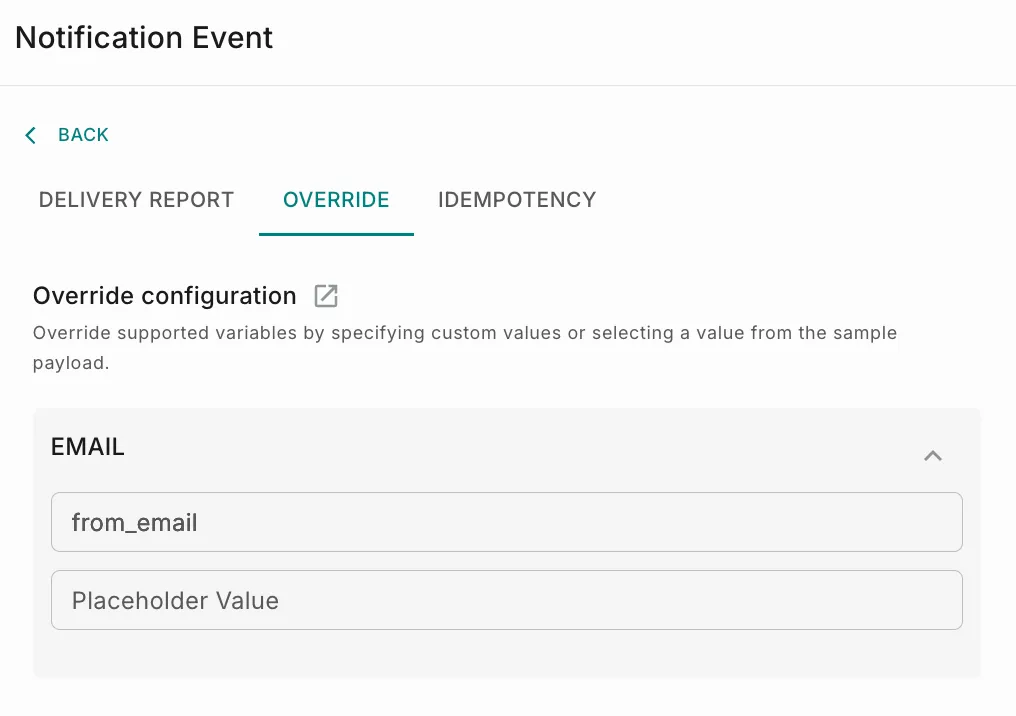
1Go to ‘Override’ tab under Settings, while configuring notification event within a workflow as shown below.
2Select the value you want to use from the payload. For example, if you want to use the variable ‘email’ from the payload for ‘from_email’, you can do it as shown above.